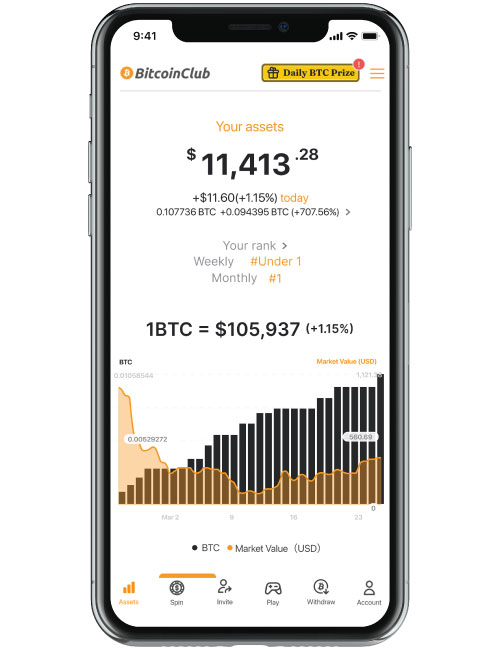
 Overview
The Assets screen gives you a complete overview of your Bitcoin balances, ranking, and earning history.
How to Navigate the Assets Screen
Here is a step-by-step guide to what you can see and open on this screen, from top to bottom:
1. Earned BTC (Tap the BTC Amount for Breakdown)
What it shows: Your actual total Bitcoin balance and its current USD market value.
Action: Tap on the BTC balance row to open a detailed breakdown screen showing exactly where your Bitcoin came from:
from Spin: BTC won from SPIN.
from Play: BTC earned from completing offers/gameplay.
from Bonus: BTC credited from promotional campaigns.
2. Your Rank (Tap "Your rank >" for Battle League)
What it shows: Your current competitive standings (Daily, Weekly, and Monthly).
Action: Tap on the "Your rank >" text to go directly to the Battle League screen, where you can check the tournament leaderboards.
3. 🔔 Notifications (Tap "See More")
What it shows: Your most recent account activities, such as daily spin visit bonuses.
Action: Tap "See More" on the right side of the Notifications header to review your full bonus history.
4. 📢 News (Tap "See More")
What it shows: Platform updates, guides, campaigns, and more.
Action: Tap "See More" on the right side of the News header to read full articles and announcement details.
How to Check Your Withdrawable BTC Details
At the very bottom of the screen, you will find the Withdraw BTC button.
Tap the "Withdraw BTC" button to open and move to the Withdraw Portal.
Inside the portal, you will see your current Withdrawable BTC amount. Tap directly on this amount to open the "Your Withdrawable BTC Balance" detail screen.
Inside this detailed screen, three separate metrics are displayed:
Withdrawable BTC Balance: The exact amount you currently hold and can withdraw right now (after meeting goals and requirements).
Total Withdrawable BTC Won: The total of all Withdrawable BTC you have ever earned in the app. Note: This is a historical total of your winnings, not the amount you currently hold.
Total Withdrawn Amount: The total amount of BTC you have already successfully transferred to your personal wallet so far.
If You Need Help
If you have any questions, please contact Customer Support.